
Support answer
Fan control on Truffle4000/8000
Search or browse documentationWith Truffle 4000/8000 here is the BIOS settings for fan control:
You may connect a USB keyboard and a monitor and press <DEL> to come to the BIOS prompt. Navigate to ‘Advanced’ tab.
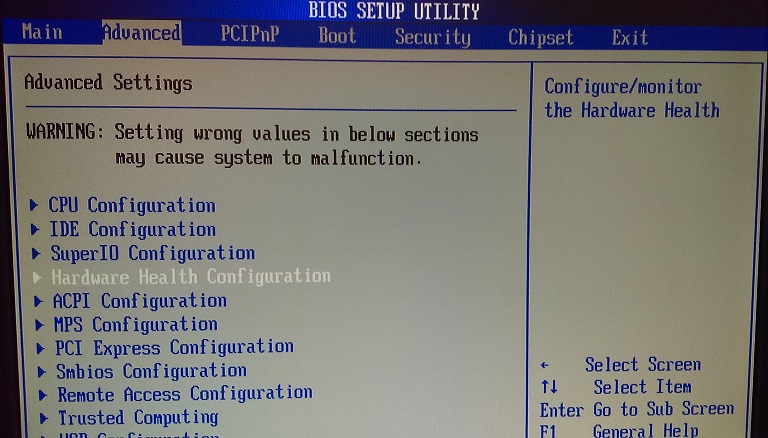
Scroll down to ‘Hardware Health Configuration’ option and press ‘Enter’.
Change the the following fans setting to ‘Thermal Cruise Mode’:
SYSFAN Mode Setting
CPUFAN0 Mode Setting
CPUFAN1 Mode Setting
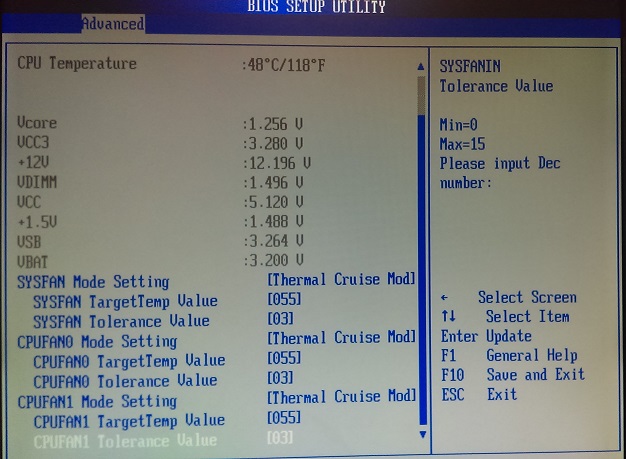
Press F4 to save and exit.